
Route Optimization Software: 9 Features That Make Fleet Routing Smarter
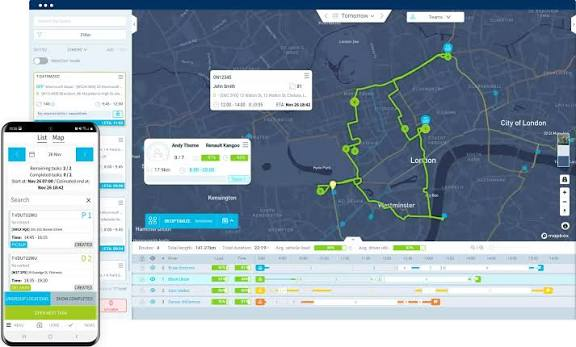
Route optimization software helps businesses plan more efficient routes for drivers, technicians, delivery teams, and service vehicles. Instead of relying on manual planning or basic map directions, the software can consider multiple stops, vehicle capacity, driver schedules, time windows, and other business rules when creating routes. As a result, companies can reduce unnecessary travel, organize daily schedules, and give field teams clearer plans.
In this guide, we will explain how route optimization software works, the features that matter most, how it differs from route management software, the businesses that benefit from it, common implementation mistakes, and how to decide whether your business needs a standard platform or a more customized solution.
What Is Route Optimization Software?
Route optimization software is a business tool that automatically determines efficient routes for vehicles traveling between multiple locations. It can evaluate different combinations of stops and assign them to drivers based on rules such as distance, travel time, capacity, appointment windows, and driver availability.
For example, imagine a service company has 30 appointments scheduled across a city and five technicians available. A dispatcher could manually assign appointments and create routes, but that process can take time and may produce inefficient schedules. Route optimization software can process the locations and constraints together, then suggest routes that fit the company’s operating requirements.
The goal does not always mean finding the shortest possible distance. A practical route may need to prioritize appointment times, vehicle capacity, driver hours, customer priorities, or operating costs.
Google’s Route Optimization API, for example, supports route planning based on objectives and constraints such as travel efficiency, on-time arrival, vehicle capacity, driver work hours, and time windows.
How Does Route Optimization Software Work?
Although the interface can look simple, route optimization involves several steps behind the scenes.
1. Collects location and job data
The system first needs information about the stops that vehicles must visit. Depending on the business, this may include customer addresses, delivery locations, service appointments, pickup requests, or job sites.
Additional information can include appointment duration, customer priority, delivery size, required equipment, and preferred arrival times.
2. Applies business constraints
Next, the software considers the rules that affect each route. For example, one vehicle may have limited capacity while another may carry specialized equipment. Similarly, a technician may only work during specific hours.
Time windows can also affect the route. If a customer requests service between 10:00 AM and 12:00 PM, the software needs to account for that requirement when arranging other stops.
3. Calculates possible route combinations
With multiple vehicles and stops, the number of possible combinations can become extremely large. Therefore, optimization systems use algorithms to search for efficient solutions instead of relying on simple manual sequencing.
Google’s OR-Tools documentation describes this as the Vehicle Routing Problem, where businesses need to determine suitable routes for multiple vehicles while considering constraints such as capacity and time windows.
For businesses interested in the technical side, the Google OR-Tools vehicle routing documentation provides examples of routing problems and different constraints.
4. Produces routes for drivers or technicians
Finally, the system produces route assignments. A dispatcher may see which vehicle handles each group of stops, the order of those stops, expected travel times, and other relevant information.
Modern systems can also support route changes during the day. For example, if a customer cancels an appointment or a new urgent job arrives, the system may recalculate assignments instead of forcing the dispatcher to rebuild the entire schedule manually.
9 Important Features of Route Optimization Software
1. Multi-stop route planning
Basic navigation tools work well when a driver needs directions from one location to another. However, businesses often need to handle many stops in a single shift.
Multi-stop planning allows the system to arrange several destinations in a suitable sequence. This can help dispatchers avoid inefficient routes that repeatedly send vehicles across the same areas.
2. Multi-vehicle optimization
Businesses with several drivers need more than a route for one vehicle. They need to determine which driver should handle which stops.
Route optimization software can distribute jobs across available vehicles while considering factors such as capacity, working hours, location, and service requirements. This makes the tool useful for delivery companies, field service businesses, logistics operators, and other mobile teams.
3. Time window management
Not every customer can accept a delivery or service visit at any time. Appointment windows therefore play an important role in route planning.
A strong system can use these time restrictions when assigning stops. This helps businesses build schedules around customer commitments instead of treating every location as equally flexible.
4. Vehicle capacity constraints
Vehicle capacity matters for delivery and logistics companies. A truck may have limits based on weight, volume, or available space.
For example, a route that looks efficient based only on distance may not work if the vehicle cannot carry all assigned deliveries. Route optimization software can account for capacity when building vehicle assignments.
5. Driver and technician schedules
Route planning also needs to reflect employee availability. A driver may start at one location and finish at another, while a technician may begin and end each day at a branch office.
By connecting route planning with employee schedules, businesses can create more realistic daily assignments. This becomes especially useful when teams operate across different shifts or service areas.
6. Real-time route adjustments
Road conditions and customer requirements can change throughout the day. A vehicle may encounter unexpected traffic, a customer may cancel, or an urgent service request may appear.
Instead of treating the morning route as fixed, modern route optimization systems can support dynamic adjustments. This gives dispatchers more flexibility when real-world conditions change.
7. Dispatch and assignment tools
Optimization becomes more useful when the resulting routes connect directly to dispatch operations.
For example, a dispatcher may assign a technician to several appointments, send the schedule to the technician, monitor progress, and update the route when circumstances change. This creates a stronger connection between planning and daily operations.
Businesses that manage technicians and field teams can also benefit from broader field service management software, especially when routing needs to work alongside scheduling, job tracking, and customer information.
8. Reporting and route performance data
Route optimization should not stop after a route gets created. Managers also need to understand how routes perform over time.
Useful reports may include planned versus actual travel time, completed stops, missed appointments, route duration, vehicle utilization, and other operational measures.
This information helps managers identify recurring problems. For instance, a route may consistently take longer than expected because several appointments require more service time than the original schedule allows.
9. Integrations
Route planning works best when it connects to the systems a business already uses.
Useful integrations can include CRM systems, dispatch software, GPS and mapping services, accounting platforms, order management systems, scheduling tools, and customer communication platforms.
Without these connections, employees may need to copy customer addresses and job information from one system into another. That extra work creates opportunities for errors and reduces the value of automation.
Route Optimization Software vs. Route Management Software
Route optimization software and route management software overlap, but they usually focus on different parts of the transportation process.
Route optimization focuses heavily on determining efficient routes and stop sequences. It answers questions such as: Which vehicle should handle these jobs? In what order should the driver visit them? How can the schedule meet customer time windows?
Route management software typically covers a broader operational process. It may include route planning, dispatching, driver tracking, delivery status, proof of delivery, customer notifications, and reporting.
In practice, the two categories can exist within the same platform. A logistics company may use optimization to create routes and then use route management features to monitor those routes throughout the day.
For example, a company that handles many deliveries may also benefit from delivery tracking software so dispatchers can monitor delivery progress after the system creates the routes.
Who Should Use Route Optimization Software?
Route optimization can benefit almost any business that sends people or vehicles to multiple locations. However, the value usually increases as the number of daily stops, vehicles, or constraints grows.
Delivery and courier companies
Delivery businesses need to manage many destinations within limited time windows. Optimization can help organize stops across drivers while accounting for delivery requirements and vehicle capacity.
Field service companies
HVAC, plumbing, electrical, cleaning, landscaping, roofing, and other service businesses send technicians to customer locations throughout the day.
For these companies, route planning can work alongside technician scheduling, job details, customer records, and dispatching.
Moving companies
Moving businesses coordinate crews, vehicles, pickup locations, and delivery destinations. Route planning becomes especially important when a crew has several locations to visit.
Businesses in this sector can also explore how software for moving companies can connect operational tasks into a single system.
Logistics and transportation companies
Companies managing fleets and frequent shipments can use optimization to assign vehicles, organize stops, and account for operational constraints.
Businesses with mobile employees
Route planning is not limited to deliveries. Any company that sends employees to customer locations may benefit from better travel planning.
For example, inspection teams, maintenance crews, installation companies, and property service providers may all have recurring multi-stop schedules.
Benefits of Route Optimization Software
Less manual planning
Dispatchers do not have to manually calculate every possible stop sequence. Instead, the software handles much of the route calculation while employees focus on exceptions and operational decisions.
Better use of vehicles
When businesses distribute stops more effectively, they can create more balanced schedules across available vehicles. This can help managers understand whether existing fleet capacity matches daily demand.
More predictable schedules
Routes that account for appointment windows, service durations, and travel requirements can give teams a clearer picture of the day ahead.
Improved customer communication
Better route planning can also support customer communication. When dispatchers have clearer schedules, they can provide more useful arrival information and respond to delays more effectively.
Better operational visibility
When route data connects with dispatch and job management, managers gain a clearer view of what each vehicle or technician should be doing throughout the day.
Common Mistakes When Implementing Route Optimization
Optimizing distance while ignoring business rules
The shortest route is not always the best route. A route that saves distance but causes a missed customer appointment can create a bigger operational problem.
Therefore, define the objectives that actually matter to your business before configuring optimization rules.
Using inaccurate customer data
Optimization depends on accurate input. Incorrect addresses, missing appointment times, outdated customer records, or inaccurate service durations can produce poor schedules.
Before implementation, clean the data that feeds your routing system.
Ignoring service duration
A route is not just driving time. A technician may spend an hour at one job and 15 minutes at another.
If the system only considers travel distance, the resulting schedule may look efficient on a map but fail in real operations.
Replacing human judgment completely
Optimization software should support dispatchers rather than remove every human decision. There may be customers with special requirements, technicians with specific expertise, or operational situations that the system cannot fully understand.
Use automation for repetitive calculations while keeping an easy way for staff to adjust assignments.
Choosing software without considering integrations
A routing platform may look powerful on its own but create extra work if employees must manually transfer information into it.
Before choosing a system, identify where customer, job, vehicle, and scheduling data currently lives. Then determine whether the software can connect to those systems.
When Should You Consider Custom Route Optimization?
Off-the-shelf route optimization software can work well when your processes closely match the features offered by the platform. However, some businesses have unique rules that standard software cannot handle cleanly.
For example, a service company may need to combine route planning with technician certifications, customer contracts, job priority, inventory availability, branch territories, and internal approval rules.
In that situation, a customized platform can connect routing directly with the rest of the business process. A company might build the system around its existing CRM, scheduling process, dispatch operations, and reporting requirements rather than forcing employees to switch between separate applications.
If routing is only one part of a larger operational problem, custom CRM development can provide a way to connect customer information, scheduling, dispatching, route planning, and reporting in one system.
How to Choose Route Optimization Software
Start by documenting how your team currently plans routes. Identify who creates the schedule, how long planning takes, which constraints matter, and where employees currently move information between systems.
Next, evaluate the software against those real processes rather than judging it only by the number of features listed on its website.
Look for:
- Multi-stop and multi-vehicle routing
- Time window support
- Vehicle capacity rules
- Driver and technician availability
- Real-time route adjustments
- Dispatch capabilities
- Mobile access for drivers and technicians
- Route and operational reporting
- CRM, scheduling, and order management integrations
- Data import and migration options
Also consider how quickly your team can adopt the system. A technically capable platform will not deliver much value if dispatchers find it difficult to use during a busy day.
Frequently Asked Questions
What is the main purpose of route optimization software?
The main purpose is to create efficient routes for vehicles or field teams while considering business requirements such as stops, travel time, vehicle capacity, driver schedules, and customer time windows.
Is route optimization the same as GPS navigation?
No. GPS navigation generally helps an individual driver travel from one location to another. Route optimization handles a larger planning problem involving multiple stops, vehicles, and business constraints.
Can route optimization software handle multiple drivers?
Yes. Many route optimization systems can assign stops across multiple vehicles and drivers. The exact capabilities depend on the software and the constraints it supports.
Can route optimization software work for field service businesses?
Yes. Field service companies can use route optimization to organize technician appointments, service territories, travel schedules, and multiple daily stops.
Does route optimization software reduce travel distance?
It can reduce unnecessary travel, but distance should not always be the only objective. A practical system may also prioritize appointment windows, driver hours, vehicle capacity, service duration, or operating costs.
Should a small business use route optimization software?
It depends on the complexity of the operation. A business with only a few daily stops may manage routes manually. However, as the number of vehicles, appointments, customers, or constraints grows, automated planning can become more valuable.
Final Thoughts
Route optimization software turns route planning from a manual scheduling task into a more structured process. By considering stops, vehicles, time windows, capacity, employee availability, and operational priorities, it can help businesses create practical routes and manage changing schedules.
However, the right solution depends on how your business actually operates. Start by identifying the routing problems that consume the most time, then evaluate whether an existing platform can solve them. If routing needs to work closely with CRM, scheduling, dispatch, job management, or other business processes, a customized system may provide a better fit.
The key is not simply to find the shortest route. The goal is to build a routing process that helps your team serve customers efficiently while fitting the real-world constraints of the business.



