
Customer Communication Software: 9 Features That Improve Customer Experience
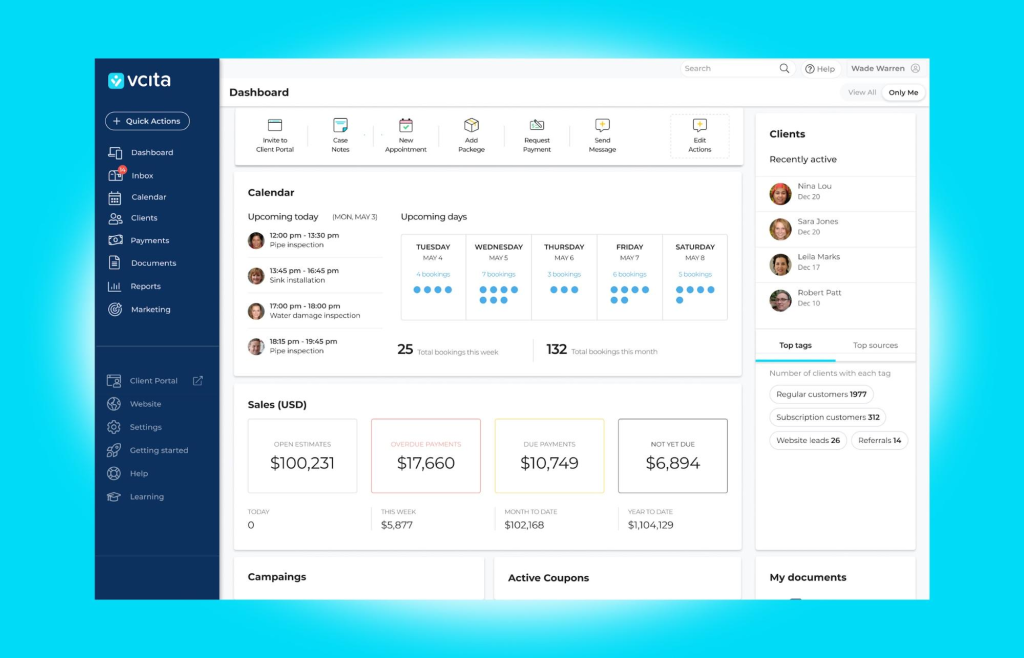
What Is Customer Communication Software?
Customer communication software helps businesses manage conversations with customers across channels such as email, phone, SMS, live chat, and social messaging. Instead of keeping customer conversations scattered across different apps, teams can use one system to organize messages, track interactions, automate routine communication, and maintain customer context.
This matters because customers often switch between communication channels depending on the situation. For example, a customer might ask a question through live chat, receive an email with a quote, and later call the business about the same issue. Without a shared communication system, employees may struggle to see the full conversation.
In this guide, we will explain how customer communication software works, the key features to look for, its benefits and limitations, common use cases, and how to choose a customer communication platform that fits your business.
How Does Customer Communication Software Work?
Customer communication software connects the channels your business uses to communicate with customers and brings relevant interactions into a central system. Depending on the platform, this can include email, phone calls, SMS, website chat, social messaging, and other digital channels.
For example, Microsoft Dynamics 365 Customer Service supports channels such as chat, voice, SMS, social channels, and Microsoft Teams. This approach gives service teams a central environment for handling conversations across different channels.
In practice, the process usually looks like this:
- A customer contacts the business through a supported channel.
- The platform receives and records the interaction.
- The system connects the conversation with the relevant customer record.
- The message reaches the appropriate employee or team.
- The employee responds from the communication platform.
- The conversation remains available for future interactions.
As a result, employees spend less time searching through separate applications and more time handling customer requests.
Customer Communication Software vs. Customer Communication Platform
The terms customer communication software and customer communication platform often describe the same type of business technology. However, the word “platform” can suggest a broader system that connects multiple communication channels, customer data, automation tools, analytics, and integrations.
A basic communication tool might focus on one channel, such as email or live chat. In contrast, a broader customer communication platform can bring several channels together and connect conversations with CRM records, support tickets, customer history, and business processes.
For example, Salesforce describes messaging as a way to bring conversations from channels such as SMS, WhatsApp, Facebook Messenger, and chat into a centralized service environment.
Therefore, businesses should focus less on the label and more on what the software actually provides. The right solution should make customer communication easier to manage while preserving useful context across interactions.
9 Key Features of Customer Communication Software
1. Omnichannel Communication
One of the most important features is support for multiple communication channels. Depending on the business, these may include email, phone, SMS, live chat, WhatsApp, social media, and web forms.
However, simply supporting many channels is not enough. The system should make those channels practical for employees to manage. Ideally, conversations from different sources should appear in a unified workspace.
For example, a customer could start a conversation through website chat and later continue it through SMS. Employees should be able to understand the previous interaction instead of asking the customer to repeat the same information.
Microsoft’s customer service documentation provides examples of multi-channel communication through chat, voice, SMS, social channels, and other communication options.
2. Centralized Customer Conversation History
Customer communication becomes much easier when employees can see previous interactions in one place.
A conversation history can include emails, calls, messages, meetings, support requests, notes, and other activities. This information gives employees useful context before they respond.
For example, imagine a customer who previously reported a billing problem. If another employee receives a new message from the same customer, the employee can review the earlier conversation before responding.
That small improvement can prevent repeated questions and inconsistent answers.
3. Automated Responses and Notifications
Automation helps teams handle repetitive communication without manually responding to every routine request.
Common examples include:
- Appointment confirmations
- Service reminders
- Order notifications
- Payment reminders
- Follow-up messages
- Welcome messages
- Status updates
- Frequently asked questions
However, automation should support human communication rather than replace it everywhere. Customers with complex questions often need a person who can understand the situation and make a decision.
A useful customer communication platform should therefore allow businesses to define when automation handles an interaction and when an employee takes over.
4. Conversation Routing
As communication volume increases, sending every customer message to the same team can create delays. Conversation routing helps direct inquiries to the right employee, department, queue, or location.
For example, a billing question can go to the finance team while a technical issue goes to technical support. Similarly, a sales inquiry can go directly to a salesperson.
Modern customer communication systems can use rules and customer information to determine where an interaction should go. This approach can reduce unnecessary handoffs and help employees focus on the conversations they are equipped to handle.
5. CRM Integration
Communication becomes more valuable when it connects directly with customer data.
A CRM integration can associate conversations with customer profiles, leads, opportunities, accounts, service requests, and other records. As a result, employees do not have to treat communication as a separate activity from the rest of the customer relationship.
For businesses that rely heavily on customer interactions, this connection can become a core part of their operating process. A customer communication system that works alongside CRM data can help sales and support teams understand what happened before, what is happening now, and what needs to happen next.
If your business needs communication features built around its existing processes rather than a standard product structure, custom CRM development can provide a more tailored approach.
6. Internal Notes and Collaboration
Customer conversations often require input from more than one employee. Therefore, communication software should provide ways for employees to collaborate without exposing internal discussions to customers.
Useful features can include internal notes, conversation assignments, mentions, tags, shared records, and escalation options.
For example, a support employee might receive a technical question that requires input from the development team. Instead of forwarding the entire conversation through email, the employee can add an internal note and assign the issue to the appropriate person.
This keeps the customer conversation organized while allowing employees to collaborate behind the scenes.
7. Search and Conversation Management
As the number of customer interactions grows, finding an old conversation becomes increasingly important.
A strong system should let employees search by customer name, email address, phone number, conversation topic, date, ticket number, or other relevant information.
In addition, filters can help employees find conversations that need attention. For example, a manager may want to view unanswered messages, escalated cases, or conversations waiting for a customer response.
Without effective search and filtering, storing more customer conversations can create another problem: too much information with no practical way to find it.
8. Analytics and Reporting
Customer communication software should not only store conversations. It should also help businesses understand communication performance.
Useful reports may track metrics such as response times, conversation volumes, unresolved requests, channel usage, and employee workloads.
For example, a business might discover that customers send many questions through live chat but receive slower responses during certain hours. Management can then adjust staffing or routing rules.
Similarly, communication data can reveal which questions appear repeatedly. Businesses can use that information to improve documentation, FAQs, self-service resources, or automated responses.
9. AI-Assisted Communication
AI is increasingly becoming part of customer communication systems. Depending on the software, AI can summarize conversations, suggest responses, classify requests, identify customer intent, or help employees find relevant information.
For instance, Microsoft documents customer communication features that can provide summaries, sentiment information, objections, and next steps from customer-related emails and meetings.
Still, AI requires appropriate controls. Businesses should review how customer data is processed, who can access it, and when employees should verify AI-generated content before sending it.
Benefits of Using a Customer Communication Platform
Better Customer Context
When conversations and customer information stay connected, employees can understand the situation faster. Consequently, customers spend less time repeating information.
Faster Responses
Centralized conversations, routing, templates, and automation can reduce the time employees spend switching between tools. This can help teams respond more consistently and efficiently.
More Consistent Communication
A shared communication system can help businesses standardize common responses, notifications, and follow-up processes. As a result, customers can receive a more consistent experience even when different employees handle their requests.
Improved Team Visibility
Managers can see conversation volumes, workloads, unresolved requests, and communication trends. Therefore, they can identify operational problems before those problems become larger customer service issues.
Fewer Communication Gaps
Scattered conversations create a risk that important information will remain inside one employee’s inbox or phone. Centralized records reduce that dependency and make customer information easier for authorized team members to access.
Common Use Cases
Customer communication software can support many types of businesses. The exact configuration depends on how customers interact with the organization.
- Service businesses: Manage customer inquiries, appointment reminders, technician updates, and follow-ups.
- Construction companies: Keep clients updated about project progress, approvals, changes, and scheduling.
- Healthcare organizations: Manage appointment communication, reminders, and patient inquiries while following applicable privacy requirements.
- E-commerce businesses: Handle order questions, delivery updates, returns, and support requests.
- Professional services: Track client communication, documents, meetings, and follow-up tasks.
- Real estate companies: Manage conversations with buyers, sellers, tenants, and property owners.
In each case, the goal remains similar: connect customer conversations with the information employees need to provide a useful response.
How to Choose the Right Customer Communication Software
Choosing a customer communication platform should start with your actual communication process rather than a list of popular features.
Start With Your Existing Channels
First, identify where customers currently contact your business. Do they primarily use email and phone, or do they also use SMS, WhatsApp, live chat, and social media?
Next, identify which channels need to be centralized. Adding every possible channel can create unnecessary complexity if your customers rarely use them.
Check CRM and Business System Integrations
Communication software should connect with the systems your employees already use. Check whether it integrates with your CRM, helpdesk, calendar, accounting system, order management software, or other important applications.
More importantly, determine what information actually moves between systems. An integration that only passes basic contact details may not solve the underlying operational problem.
Evaluate Automation Carefully
Look for automation that removes repetitive work without creating a frustrating customer experience.
For example, automated appointment reminders can save time while still providing clear value to customers. On the other hand, forcing customers through an automated sequence when they need a human can create unnecessary friction.
Consider Reporting Requirements
Decide which communication metrics matter to your business before selecting a platform. A support team may care about response and resolution times, while a sales team may focus more on follow-ups and customer engagement.
Review Security and Access Controls
Customer conversations can contain sensitive information. Therefore, review user permissions, access controls, data handling practices, retention settings, and any compliance requirements that apply to your industry.
Common Mistakes to Avoid
Even good software can produce poor results when businesses implement it without a clear process.
- Adding too many channels: Supporting channels your customers rarely use can increase complexity without adding much value.
- Ignoring customer context: Storing messages without connecting them to customer records limits their usefulness.
- Automating everything: Some situations require human judgment and empathy.
- Skipping employee training: Teams need clear guidelines for using communication tools consistently.
- Ignoring internal processes: Software should support how your business operates instead of creating unnecessary steps.
- Measuring only message volume: More conversations do not automatically mean better communication. Response quality, resolution, and customer outcomes also matter.
When Should You Consider Custom Customer Communication Software?
Off-the-shelf customer communication software can work well when your business follows common processes. However, custom development can make sense when communication is closely connected to specialized operations.
For example, a service company may need customer messages to connect with jobs, technicians, locations, invoices, scheduling, and payment status. A construction company may need conversations tied to projects, change orders, approvals, documents, and progress updates.
In those cases, a standalone communication tool may not provide enough context. A custom system can combine communication with the business data and processes employees already depend on.
The key question is not whether custom software has more features. Instead, ask whether your communication process contains requirements that standard platforms cannot handle efficiently.
Frequently Asked Questions
What is customer communication software?
Customer communication software helps businesses manage customer conversations across channels such as email, phone, SMS, live chat, and social messaging. It can also connect conversations with customer records, automation, support processes, and analytics.
What is a customer communication platform?
A customer communication platform is a centralized system for managing customer interactions across one or more communication channels. Broader platforms may also provide CRM integration, automation, routing, analytics, and collaboration features.
Is customer communication software the same as CRM software?
Not always. CRM software manages customer and business relationship data, while communication software focuses more directly on conversations and interactions. However, many modern systems combine communication capabilities with CRM functionality.
Which communication channels should a business support?
That depends on how your customers prefer to communicate. Common channels include email, phone, SMS, live chat, WhatsApp, and social messaging. Businesses should prioritize channels that customers actually use rather than adding channels simply because they are available.
Can customer communication software automate customer support?
Yes. Many platforms can automate routine replies, reminders, notifications, routing, and other repetitive tasks. However, businesses should keep human support available for complex or sensitive issues.
What should I look for when buying customer communication software?
Focus on channel support, conversation history, CRM integration, automation, routing, collaboration, reporting, security, scalability, and ease of use. Most importantly, make sure the platform fits your existing customer communication process.
Conclusion
Customer communication software gives businesses a structured way to manage customer conversations across multiple channels. Instead of leaving emails, calls, messages, and support requests scattered across separate tools, teams can connect communication with customer data and business processes.
The most useful customer communication platform is not necessarily the one with the longest feature list. Instead, it should support the channels your customers use, preserve conversation context, reduce repetitive work, and help employees respond efficiently.
Start by mapping how customers contact your business today. Then identify the communication gaps, repetitive tasks, and information employees struggle to find. From there, you can determine whether an off-the-shelf platform provides enough functionality or whether a more customized system makes sense.



