
Kitchen Management System: 9 Features for Faster, Smarter Kitchen Operations
A kitchen management system helps restaurants and foodservice businesses coordinate orders, food preparation, inventory, staff tasks, and daily kitchen workflows from one place. Instead of relying on paper tickets, spreadsheets, disconnected apps, and manual stock counts, teams can use a central system to keep kitchen operations organized and visible.
This matters because a busy kitchen must manage several moving parts at once. Ingredients need to stay available, orders need to reach the right station, prep work needs clear priorities, and stock levels need regular attention. In addition, food businesses must maintain safe handling and storage practices. The FDA Food Code provides a model for retail and foodservice food safety requirements, while local authorities may adopt their own rules based on that model.
In this guide, we will explain what a kitchen management system does, how a kitchen inventory management system supports stock control, the key features to look for, common benefits and limitations, implementation steps, and mistakes to avoid.
What Is a Kitchen Management System?
A kitchen management system is software that helps restaurants, cafes, catering companies, hotels, and other foodservice operations manage kitchen activities digitally. It connects information such as orders, recipes, ingredients, preparation tasks, inventory, staff assignments, and operational records.
For example, when a customer places an order, the system can send the relevant details to the kitchen. Staff can then see what needs to be prepared, which station should handle the task, and what ingredients the order requires.
At the same time, managers can monitor kitchen activity without constantly checking different paper sheets or asking employees for updates.
A kitchen management system connects kitchen workflows so teams can coordinate orders, preparation, inventory, and staff tasks with less manual work.
How Does a Kitchen Management System Work?
A kitchen management system typically works by collecting operational data in one central platform and making that information available to the people who need it.
For instance, an order may enter the system through a point-of-sale platform. The kitchen then receives the order details, assigns preparation tasks, and tracks progress. If the order requires ingredients that have reached a low stock level, the inventory module can flag the shortage for review.
Similarly, managers can use dashboards to monitor open orders, preparation status, stock levels, waste records, and other kitchen activities.
Depending on the software, the system may also connect with POS, accounting, purchasing, delivery, employee scheduling, or other business applications. The exact workflow depends on the restaurant’s size, operating model, and technology setup.
9 Key Features of a Kitchen Management System
1. Kitchen Order Management
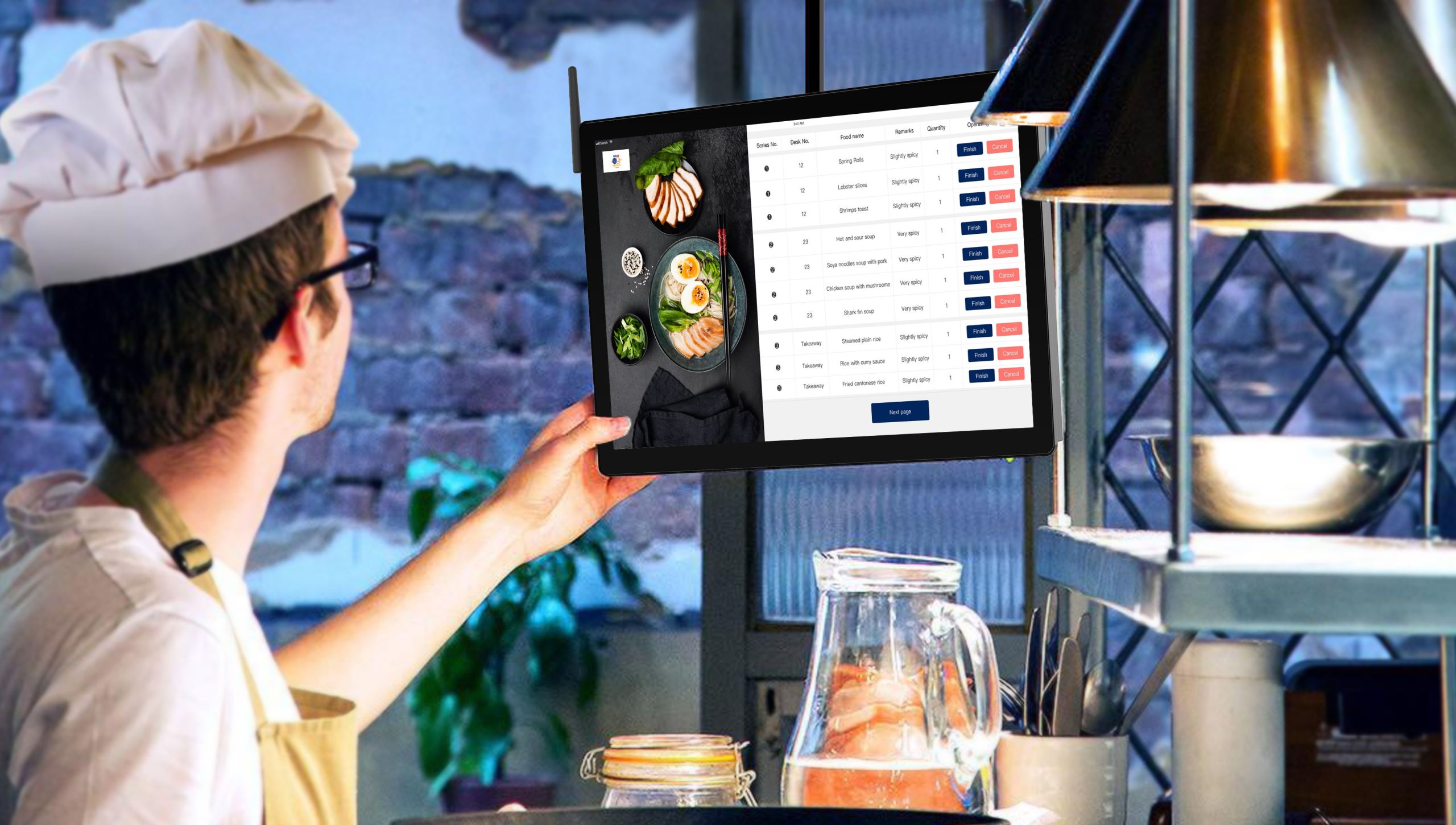
Order management gives kitchen staff a clear view of incoming orders and their current status. Instead of depending on handwritten tickets, employees can view order details digitally and organize work according to the kitchen workflow.
The system can display information such as items ordered, quantities, modifiers, special instructions, and order status. This makes it easier for staff to understand what needs attention at each stage.
For restaurants that already rely heavily on digital ordering, integrating kitchen workflows with a POS platform can create a more connected process. An existing Anomoz resource on POS for Cafe also covers how POS features can support orders, payments, and inventory.
2. Kitchen Display and Task Tracking
A kitchen display gives employees a real-time view of work that needs to be completed. Instead of searching through multiple tickets, staff can prioritize tasks based on order time, preparation requirements, or station responsibilities.
For example, a system can separate grill, fryer, salad, beverage, and plating tasks. This approach helps each employee focus on the work assigned to their station.
Managers can also track order progress. Therefore, they can identify bottlenecks more quickly when a particular station starts falling behind.
3. Kitchen Inventory Management
Inventory control plays a central role in kitchen operations. A kitchen inventory management system helps businesses track ingredients, quantities, stock movements, and replenishment needs.
Instead of counting every item manually and updating a spreadsheet later, employees can record purchases, usage, transfers, adjustments, and waste in a central system.
For example, if a restaurant uses chicken, cooking oil, vegetables, sauces, and dairy products every day, the system can maintain records for each item. Managers can then review current stock and identify items that need replenishment.
For a broader explanation of inventory software capabilities, see Anomoz’s guide to inventory management software features.
4. Recipe and Ingredient Management
Recipe management connects menu items with their required ingredients. This feature can help restaurants maintain consistent preparation instructions while giving managers a clearer view of ingredient requirements.
For example, a burger recipe may require a specific quantity of beef, buns, cheese, sauce, and vegetables. When the recipe connects to inventory, the business can better understand how menu sales affect ingredient usage.
Recipe records can also help new employees follow standardized preparation instructions instead of relying entirely on verbal training.
5. Purchase and Supplier Management
A kitchen depends on regular purchasing to keep essential ingredients available. A management system can help teams record suppliers, purchase orders, item costs, delivery information, and replenishment requirements.
When stock reaches a defined threshold, managers can review the items that require purchasing. As a result, the purchasing process becomes more structured.
However, automation should support purchasing decisions rather than replace human oversight. Demand can change because of seasonality, promotions, special events, menu changes, or unexpected order volumes.
6. Food Waste Tracking
Food waste can occur because of expired ingredients, overproduction, preparation errors, damaged stock, incorrect orders, or other operational issues.
A kitchen management system can give staff a structured way to record discarded items and the reason for the waste. Managers can then review the records to identify recurring patterns.
For example, if a particular ingredient frequently expires before use, the business may need to adjust purchasing quantities, storage practices, menu planning, or preparation levels.
Do not treat waste tracking as a reporting exercise only. Use the recorded reasons to identify operational changes that could reduce unnecessary purchasing and preparation.
7. Food Safety and Compliance Records
Kitchen software can also help teams organize operational records related to food safety. Depending on the system, this may include temperature logs, cleaning schedules, inspection checklists, incident records, and task confirmations.
The FDA’s 2026 Food Code provides a model for safeguarding food in retail and foodservice environments. However, restaurants should also follow the requirements of the authorities that regulate their specific location.
Digital records can make routine checks easier to organize. More importantly, they can give managers a clearer record of whether required tasks have been completed.
8. Staff Scheduling and Task Assignment
Kitchen performance depends on people as much as software. A system can help managers assign tasks, organize shifts, and clarify responsibilities.
For example, a manager might assign opening tasks to one employee, preparation work to another, and closing checks to another. Employees can then see what they need to complete during their shift.
When task assignment connects with kitchen workflows, managers can reduce confusion during busy periods. However, scheduling still needs to account for employee availability, skills, workload, and local labor requirements.
9. Reports and Operational Dashboards
Reports turn daily kitchen activity into information managers can review. Useful reports may cover ingredient usage, waste, purchasing, order volume, preparation times, stock adjustments, and other operational measures.
For instance, a manager could compare ingredient consumption against sales activity to identify unusual usage patterns. Similarly, order data can help reveal periods when the kitchen experiences heavier demand.
The goal is not to collect data for its own sake. Instead, reports should help managers make practical decisions about purchasing, staffing, menu planning, and workflow improvements.
Kitchen Management System vs. Kitchen Inventory Management System
Although these terms overlap, they describe different scopes.
| Area | Kitchen Management System | Kitchen Inventory Management System |
|---|---|---|
| Primary focus | Overall kitchen operations | Ingredient and stock control |
| Orders | Tracks kitchen order workflows | Usually supports order-related stock usage |
| Inventory | May include inventory features | Core function |
| Recipes | May connect recipes to operations | Often connects recipes with ingredient quantities |
| Staff tasks | Can assign and track kitchen tasks | Usually has limited staff workflow features |
| Waste | Can track waste as part of operations | Tracks inventory-related waste and adjustments |
In practice, many businesses benefit from combining both functions. A restaurant may need inventory control, but it also needs order coordination, preparation workflows, staff tasks, and operational reporting.
That broader approach explains why kitchen software often works best as a connected operational platform rather than as an isolated stock-counting tool.
Benefits of Using a Kitchen Management System
Better visibility across kitchen operations
Managers can see orders, tasks, stock information, and operational records in one place. Therefore, they spend less time collecting updates manually.
More organized inventory control
Digital stock records can make it easier to identify low-stock items, review usage, and plan replenishment. This becomes especially useful for kitchens that handle large numbers of ingredients.
Faster communication
Digital order and task information reduces the need for employees to repeatedly communicate order details across stations. As a result, staff can focus more directly on preparation.
Improved waste visibility
When employees record waste consistently, managers gain more information about where losses occur. This can support better purchasing and preparation decisions.
More consistent processes
Standardized recipes, checklists, task assignments, and workflows can give employees clearer guidance. In addition, digital records make it easier to review whether routine tasks were completed.
How to Choose the Right Kitchen Management System
The right platform depends on the kitchen’s size, menu complexity, number of locations, existing software, and operational priorities. Therefore, businesses should evaluate their actual workflow before selecting a product.
Start by mapping the current process from order entry to food preparation, inventory usage, service, and closing tasks. Then identify where employees lose time or where managers lack reliable information.
Next, evaluate the system against these practical requirements:
- Order and kitchen workflow management
- Ingredient and inventory tracking
- Recipe and menu management
- Purchase and supplier records
- Waste tracking
- Food safety and task checklists
- Staff scheduling and assignments
- Reports and dashboards
- POS and other software integrations
- Mobile access for managers and staff
For restaurants that want to connect kitchen workflows with broader restaurant operations, Anomoz’s restaurant management software features guide provides additional context.
Finally, test the system with real kitchen scenarios. Create sample orders, update ingredient quantities, record waste, assign staff tasks, and review reports. A system may look strong in a feature list but still create friction if it does not match the way your kitchen actually works.
Common Mistakes to Avoid
Choosing software without first understanding the existing workflow can create unnecessary complexity. Teams may end up adapting their processes to the software instead of solving the problems that led them to seek a system in the first place.
Another common mistake involves tracking too much information without deciding how managers will use it. Every report should have a clear purpose.
Businesses should also avoid treating inventory data as automatically accurate. Employees still need clear procedures for receiving stock, recording adjustments, counting items, and handling waste.
Finally, do not overlook integrations. If the kitchen system cannot exchange information with the POS, purchasing tools, accounting platform, or other important systems, employees may continue entering the same data multiple times.
Software can organize food safety and inventory workflows, but it does not replace proper employee training, safe food handling, or compliance with applicable local regulations.
When Should You Consider Custom Kitchen Software?
Off-the-shelf software can work well when your kitchen follows common workflows and the available features match your needs. However, custom software becomes worth considering when standard platforms create too many workarounds.
For example, a multi-location food business may need a specific combination of recipe management, inventory transfers, purchasing rules, kitchen displays, staff workflows, reporting, and integrations. A custom platform can bring those requirements into one tailored workflow instead of forcing the business to use several disconnected tools.
Custom development can also make sense when a business has an existing POS or ERP environment and needs kitchen operations to connect with it in a specific way.
The key question is not whether custom software has more features. Instead, ask whether the software can support the processes that make your operation different.
Frequently Asked Questions
Frequently Asked Questions
What does a kitchen management system do?
It helps manage kitchen orders, preparation tasks, inventory, recipes, staff workflows, waste, food safety records, and operational reporting from a central platform.
What is a kitchen inventory management system?
A kitchen inventory management system tracks ingredients and supplies, including stock quantities, purchases, usage, waste, adjustments, and replenishment needs.
Can kitchen management software reduce food waste?
It can help by recording wasted ingredients and the reasons for waste. Managers can then review patterns and adjust purchasing, preparation, or storage practices.
Can a kitchen management system integrate with POS software?
Many systems support POS integration. The exact capabilities vary, so businesses should confirm which order, menu, payment, inventory, and reporting data the integration can exchange.
Is a kitchen management system suitable for small restaurants?
It can be, especially when manual order tracking, stock counts, or task coordination starts creating operational problems. Small restaurants should choose a system that fits their current workflow without adding unnecessary complexity.
Final Thoughts
A kitchen management system can bring order, inventory, preparation, staff tasks, waste tracking, and operational reporting into one connected workflow. More importantly, it gives managers and kitchen teams better visibility into the work that happens throughout the day.
A kitchen inventory management system can strengthen that workflow by keeping ingredient data organized and making replenishment, usage, and waste easier to monitor. However, software works best when it supports clear processes rather than trying to replace them.
Before choosing a platform, map your current kitchen workflow, identify the biggest operational gaps, and test the features against real scenarios. If standard software cannot support your processes or integrations, custom development may provide a more suitable path.
Build software around how your kitchen works
If your kitchen needs a tailored system for orders, inventory, workflows, reporting, or integrations, custom software can be designed around your actual operating processes.



