
Proposal Software: 9 Features That Help Teams Create and Close Deals Faster
Proposal software helps businesses create, customize, send, track, and manage sales proposals without relying on scattered documents, email threads, and manual follow-ups. Instead of rebuilding every proposal from scratch, teams can use templates, reusable content, pricing tools, approval steps, and electronic signatures to manage the process in one place.
For sales teams, agencies, consultants, contractors, and service businesses, this matters because a proposal often connects the sales conversation to the final agreement. A slow or inconsistent process can create delays, pricing mistakes, and missed follow-ups. Proposal software brings structure to that process while giving teams better visibility into what happens after they send a proposal.
In this guide, we’ll explain what proposal software does, how proposal management software works, the features to look for, its benefits and limitations, common mistakes, and how to decide whether your business needs an off-the-shelf platform or a custom solution.
What Is Proposal Software?
Proposal software is a business application that helps teams create and manage professional proposals digitally. Depending on the platform, it can support the entire process from creating a document to collecting approval or an electronic signature.
Traditional proposal creation often involves several disconnected tools. A salesperson might copy information into a Word document, export it as a PDF, email it to the prospect, wait for a response, and then manually update a CRM. Proposal software connects more of these steps into a single process.
For example, a sales representative could select a proposal template, pull customer information from a CRM, add services and pricing, send the document to the prospect, monitor engagement, and receive an electronic signature without repeatedly entering the same information.
Modern platforms can also connect proposals with CRM systems, payment tools, document storage, and other business applications. PandaDoc, for example, describes integrations with CRM and payment platforms as part of its proposal workflow.
How Does Proposal Software Work?
The exact process varies by platform. However, most proposal systems follow a similar sequence.
- Select a template: The team starts with a reusable proposal template rather than a blank document.
- Add customer information: Customer, company, project, and contact information can populate the proposal automatically when integrations are available.
- Build the proposal: The user adds the scope of work, pricing, timeline, terms, images, and other relevant information.
- Review and approve: Internal users review the proposal before it reaches the customer.
- Send the proposal: The completed document goes to the prospect through email or a secure online link.
- Track activity: The team can monitor proposal status and, depending on the platform, recipient engagement.
- Collect acceptance: The prospect accepts the proposal or signs it electronically.
- Continue the sales process: The accepted proposal can trigger the next step, such as contract creation, invoicing, payment, or project onboarding.
As a result, proposal software can turn proposal creation from a one-off document task into a repeatable business process.
9 Key Features of Proposal Software
1. Reusable Proposal Templates
Templates are one of the most useful features for teams that send similar proposals regularly. Instead of starting with a blank page, users can create approved templates for different services, industries, or project types.
For instance, a marketing agency might maintain separate templates for SEO, paid advertising, and website development. A construction company could create templates for renovation, commercial construction, and maintenance projects.
More importantly, templates help teams maintain consistent branding and reduce repetitive work.
2. Drag-and-Drop Proposal Builder
A visual editor allows users to assemble proposals without depending on a developer or designer for every change. Teams can add text, images, tables, pricing sections, signatures, and other content directly within the proposal builder.
This approach also makes it easier to adapt a standard proposal for a specific prospect. Therefore, salespeople can personalize proposals without rebuilding the entire document.
3. Dynamic Pricing and Quote Management
Pricing can become complicated when a proposal includes multiple products, services, quantities, discounts, or optional packages. A proposal system with structured pricing tables can calculate totals and present pricing in a clearer format.
For example, a software agency could offer three implementation packages while allowing the salesperson to add optional integrations. The proposal can then show the selected services and resulting total before the customer reviews it.
For businesses that already use a CRM with quoting capabilities, proposal tools can also connect pricing information to customer and deal records. HubSpot, for example, documents quote functionality that supports pricing, acceptance, signatures, and payments within its revenue tools.
4. Approval Workflows
Not every proposal should go directly to a customer. Large discounts, unusual contract terms, or high-value projects may require internal approval.
Proposal management software can help route these documents to the appropriate people before sending them externally. This gives businesses a defined review process instead of relying on informal email messages.
As a result, teams can reduce the chance of sending a proposal with incorrect pricing or unapproved terms.
5. Electronic Signatures
Electronic signatures can remove another step from the sales process. Instead of asking customers to print, sign, scan, and email documents back, businesses can provide a digital signing experience.
Different types of electronic and digital signatures provide different levels of identity verification and security. Adobe’s documentation explains the distinction between basic electronic signatures, signatures with additional identification, and certificate-based digital signatures.
For businesses with specific legal or regulatory requirements, the appropriate signing method depends on the transaction, jurisdiction, and applicable requirements. Therefore, companies should verify their legal obligations before selecting a signing method.
6. Proposal Tracking and Notifications
Sending a proposal does not mean the sales process has stopped. Teams often need to know whether a prospect has reviewed the document and whether someone needs to follow up.
Proposal tracking can provide visibility into document status and recipient activity. Some platforms notify users when recipients open or interact with a proposal, giving sales representatives useful context for follow-up conversations.
However, teams should treat engagement data as a signal rather than a guarantee of buying intent. A prospect opening a proposal does not necessarily mean they are ready to purchase.
7. CRM Integration
CRM integration becomes important when proposal information needs to move between sales and document systems.
Without integration, employees may need to copy customer names, company details, product information, pricing, and deal data from one application to another. That creates extra work and increases the chance of data entry errors.
With an integration, a proposal can use information already stored in the CRM. This creates a more connected sales process and makes it easier to keep customer records synchronized.
Businesses that need deeper CRM functionality can also explore custom CRM development when their sales process does not fit neatly into an off-the-shelf system.
8. Content Libraries
Sales teams often reuse certain sections across many proposals. These may include company information, service descriptions, case studies, legal terms, FAQs, pricing explanations, and standard introductions.
A content library allows approved sections to remain available for reuse. Therefore, salespeople do not need to search through old proposals every time they need a particular paragraph.
More importantly, centralized content can help businesses maintain consistency when several employees create proposals.
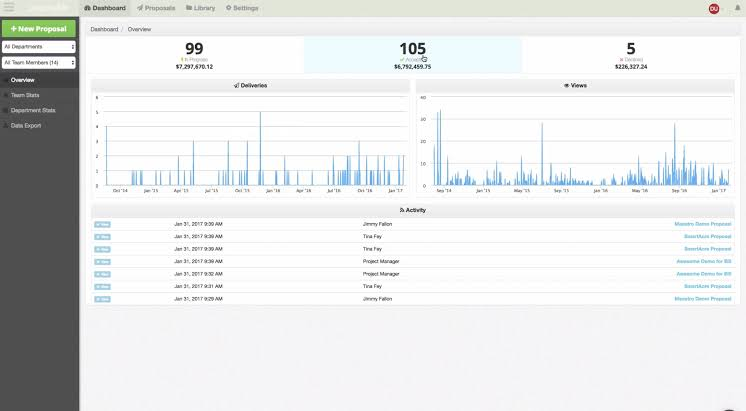
9. Reporting and Proposal Analytics
Proposal analytics can help businesses understand what happens after documents leave the sales team’s hands.
Useful metrics may include:
- Number of proposals created
- Number of proposals sent
- Accepted and rejected proposals
- Average time to acceptance
- Proposal value
- Outstanding proposals
- Proposal activity by salesperson
- Conversion rates across proposal types
These metrics can reveal where the proposal process slows down. For example, if proposals frequently remain pending for several weeks, the business may need to improve qualification, follow-up, pricing, or approval procedures.
What Is Proposal Management Software?
Proposal management software focuses on managing the broader lifecycle of proposals rather than simply helping users design documents.
That distinction matters. A document editor helps you write a proposal. Proposal management software can help you create, review, approve, send, track, update, and organize proposals as part of a larger sales process.
For example, a proposal management process might look like this:
- A sales representative qualifies a prospect.
- The representative creates a proposal from an approved template.
- Customer and deal information flows into the proposal.
- A manager reviews pricing or discounts.
- The proposal reaches the prospect.
- The sales representative receives an activity notification.
- The prospect accepts and signs the proposal.
- The sales system updates the deal and starts the next business process.
Therefore, proposal management software becomes more valuable as proposal volume, team size, and sales complexity increase.
Benefits of Using Proposal Software
Faster Proposal Creation
Templates, reusable content, and structured pricing reduce the amount of manual work required for each proposal. Salespeople can spend more time discussing customer needs instead of formatting documents.
More Consistent Proposals
Standard templates help businesses maintain consistent branding, messaging, pricing structures, and terms. This becomes particularly useful when several employees create proposals.
Fewer Manual Errors
Manual copying can introduce incorrect names, pricing, quantities, or project details. Automated fields and integrations can reduce repetitive data entry.
Better Sales Visibility
Instead of wondering whether a proposal remains unanswered, sales teams can use status tracking and activity information to manage their follow-up process.
Smoother Customer Experience
A professional digital proposal can make it easier for customers to review scope, pricing, terms, and next steps. Furthermore, electronic acceptance can reduce unnecessary back-and-forth.
Centralized Proposal Records
When proposals live across individual computers, email inboxes, and shared folders, finding the latest version can become difficult. A centralized system provides a clearer record of proposal activity.
Proposal Software vs. Proposal Management Software
The terms often overlap, but businesses can use them to describe slightly different levels of functionality.
| Capability | Proposal Software | Proposal Management Software |
|---|---|---|
| Proposal creation | Yes | Yes |
| Templates | Usually | Usually |
| Pricing tools | Common | Common |
| Electronic signatures | Often | Often |
| Tracking | Often | Yes |
| Approval workflows | May be available | Common |
| CRM integration | Common on advanced platforms | Common |
| Advanced reporting | Varies | More likely |
| End-to-end process management | Varies | Primary focus |
In practice, the distinction depends on the product. Many modern platforms combine both functions, so businesses should evaluate capabilities rather than choose a tool based only on its label.
When Should a Business Use Proposal Software?
Proposal software makes the most sense when proposals play a regular role in generating revenue.
You may benefit from it if your business:
- Creates multiple proposals every week or month
- Uses similar proposal formats repeatedly
- Has multiple people creating or approving proposals
- Needs consistent pricing and branding
- Frequently follows up on outstanding proposals
- Uses a CRM and wants proposal data connected to sales records
- Needs electronic signatures
- Wants better visibility into proposal performance
- Manages proposals with multiple approval steps
On the other hand, a business that sends only a few simple proposals each year may not need a dedicated proposal platform. A document editor and electronic signature service may provide enough functionality.
How to Choose the Right Proposal Software
Start with your existing sales process instead of choosing a platform based only on its feature list.
Consider Your Proposal Volume
Estimate how many proposals your team creates each month. A small consulting business may need a simple system, while a large sales organization may require advanced automation and reporting.
Review Your Current Tools
Check which CRM, accounting, payment, document storage, and communication tools your team already uses. Strong integrations can prevent employees from entering the same information multiple times.
Check Pricing Flexibility
If your proposals contain complex products, services, packages, discounts, or quantities, make sure the software can handle your pricing model without manual calculations.
Evaluate Approval Requirements
Ask whether proposals require manager, finance, legal, or executive approval. If they do, look for configurable approval processes rather than relying on email-based reviews.
Think About the Customer Experience
The customer should be able to understand the proposal quickly. Look for clean layouts, easy navigation, clear pricing, simple acceptance, and convenient signing.
Check Reporting Needs
Decide which metrics actually matter to your business. A simple team may need proposal status tracking, while a larger organization may want performance reporting by salesperson, service, market, or proposal type.
Common Proposal Software Mistakes
Using Templates Without Personalization
Templates save time, but a proposal that feels copied can weaken the customer experience. Use templates for structure while tailoring the scope, goals, pricing, and recommendations to each prospect.
Making Proposals Too Long
More content does not automatically create a stronger proposal. Focus on the customer’s problem, your recommended solution, deliverables, timeline, pricing, terms, and next steps.
Ignoring Follow-Up
Even a well-designed proposal needs appropriate follow-up. Use proposal status and engagement information to organize your next action instead of leaving every document in an inbox.
Separating Proposals From the CRM
When salespeople create proposals without connecting them to customer and deal records, managers can lose visibility into the sales pipeline. Whenever possible, connect proposal activity to the broader sales process.
Automating a Broken Process
Automation can speed up a poor process just as easily as a good one. First, define who creates proposals, who approves them, what information they require, and what happens after acceptance. Then automate the repetitive parts.
Should You Buy Proposal Software or Build a Custom System?
Off-the-shelf proposal software can work well when your business follows a fairly standard sales process. It can provide templates, document creation, tracking, signatures, and integrations without requiring your company to build and maintain the underlying application.
However, some businesses have proposal processes that connect closely with quoting, project management, inventory, customer records, scheduling, billing, or industry-specific requirements. In those situations, a standalone proposal platform may create another system that employees must manage.
A custom system can make sense when proposals form part of a larger operational process. For example, a construction company may want a proposal to connect directly with estimates, project budgets, change orders, customer records, and billing. A service company may want proposal acceptance to automatically create a job and notify the operations team.
The key question is not whether custom software has more features. Instead, ask whether your current tools support the way your business actually operates without creating unnecessary manual work.
Frequently Asked Questions
What does proposal software do?
Proposal software helps businesses create, customize, send, track, approve, and manage sales proposals. Depending on the platform, it can also support pricing, CRM integration, electronic signatures, payments, and reporting.
What is proposal management software?
Proposal management software manages the broader proposal lifecycle. It can cover creation, templates, collaboration, approvals, sending, tracking, signing, reporting, and post-acceptance processes.
Can proposal software integrate with a CRM?
Yes. Many proposal platforms integrate with CRM systems so teams can use customer and deal information when creating proposals. This can reduce duplicate data entry and connect proposal activity with the sales pipeline.
Does proposal software include electronic signatures?
Many platforms include electronic signatures, although available signing methods and compliance features vary. Businesses with specific legal or regulatory requirements should review the signing options carefully.
Is proposal software useful for small businesses?
Yes, particularly when a small business sends proposals regularly. However, companies with very low proposal volume may find that a document editor and separate signing tool provide enough functionality.
Can proposal software automate follow-ups?
Some platforms can automate reminders and other follow-up tasks. However, automation should support a defined sales process rather than replace thoughtful communication with prospects.
Conclusion
Proposal software gives businesses a structured way to create, send, track, approve, and manage sales proposals. The most useful platforms go beyond document design by connecting proposals with pricing, CRM records, approval processes, electronic signatures, and sales reporting.
For teams that create proposals regularly, the biggest opportunity often comes from removing repetitive work and connecting the proposal to the rest of the sales process. Therefore, start by mapping how your team creates and manages proposals today. Then choose software that addresses the actual bottlenecks.
If your proposal process needs to connect deeply with CRM, quoting, operations, billing, or other business systems, a custom solution may provide a more suitable approach than adding another disconnected application.



