
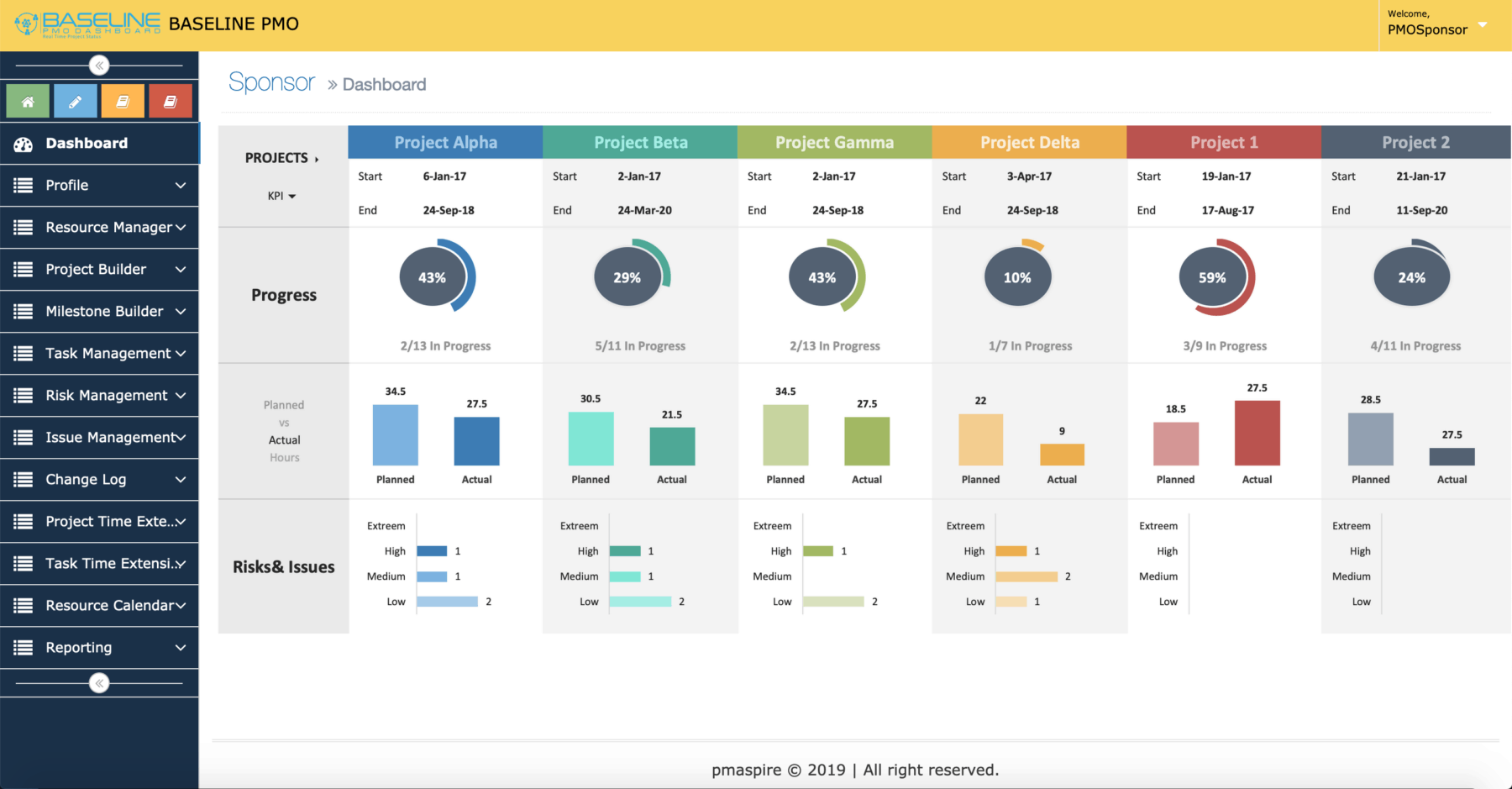
Project Management System: 10 Essential Features for Better Project Control
A project management system gives teams a structured way to plan work, assign responsibilities, track progress, manage resources, and deliver projects with greater control. Instead of relying on scattered spreadsheets, emails, chat messages, and disconnected files, teams can use one system to organize project information and coordinate daily work.
For growing businesses, the right project management software can also make it easier to understand what needs attention, who owns each task, and whether a project remains aligned with its goals. In this guide, we will explain how a project management system works, explore 10 essential features, discuss its benefits and limitations, and share practical tips for choosing the right solution.
What Is a Project Management System?
A project management system is a structured combination of processes, people, information, and tools used to plan and control project work. In practice, it helps teams move from an initial project idea to planning, execution, monitoring, and completion.
Project management involves applying knowledge, skills, tools, and techniques to project activities to meet requirements. The Project Management Institute also highlights areas such as scope, deliverables, planning, and execution as important parts of project management.
A digital project management system takes these activities and brings them into a central workspace. For example, a team might create a project, divide it into tasks, assign those tasks to employees, add deadlines, monitor progress, share documents, and review project performance from one platform.
Key takeaway
A project management system does more than store tasks. It connects project planning, people, deadlines, resources, communication, and progress so teams can manage work from a shared source of information.
How Does a Project Management System Work?
Although different platforms use different interfaces, most project management systems follow a similar workflow.
- Define the project: Establish the objective, scope, expected deliverables, and major requirements.
- Break down the work: Divide the project into tasks, milestones, and smaller activities.
- Assign responsibilities: Give each task an owner and clarify who needs to contribute.
- Set schedules: Add deadlines, dependencies, milestones, and expected completion dates.
- Execute the work: Team members complete tasks and update their progress.
- Monitor performance: Project managers review schedules, resources, risks, and outstanding work.
- Communicate changes: Teams share updates and respond to issues as the project develops.
- Close the project: Confirm deliverables, document important information, and capture lessons for future work.
Therefore, the system becomes a central place where project information can support everyday decisions. The current PMBOK Guide from the Project Management Institute emphasizes areas including governance, scope, schedule, finance, stakeholders, resources, and risk, which shows why effective project management extends beyond simple task lists.
10 Essential Features of a Project Management System
1. Project Planning and Setup
Strong project planning starts with a clear definition of what the team needs to accomplish. A project management system should let users create projects, define objectives, establish deadlines, and organize major deliverables.
For example, a software company launching a new website might create separate work areas for design, content, development, testing, and launch. This structure gives everyone a clear view of the project from the beginning.
2. Task and Subtask Management
Large projects become easier to manage when teams divide them into smaller pieces of work. Task management lets managers create activities, assign owners, set due dates, add descriptions, and track completion.
Subtasks add another level of detail when a task requires several actions. As a result, employees can focus on specific responsibilities without losing sight of the larger project objective.
A useful project management system should also make task status easy to understand. Common statuses include not started, in progress, blocked, under review, and completed.
3. Scheduling and Milestone Tracking
Deadlines help teams understand when work should happen. However, projects often contain dependencies, meaning one activity cannot begin until another activity reaches a certain point.
Scheduling tools help managers organize these relationships. Milestones can then mark important stages, such as completing a prototype, approving a design, finishing testing, or launching a product.
For projects with complex schedules, visual planning tools such as timelines or Gantt-style views can make dependencies easier to understand.
4. Team Collaboration
Projects often involve multiple people working on related tasks. Therefore, collaboration features can reduce the need to search through separate communication channels for project information.
Useful collaboration capabilities can include task comments, mentions, file sharing, notifications, activity histories, and shared project discussions.
Teams that need broader collaboration capabilities can also review resources such as team collaboration software to understand how collaboration tools can support distributed work.
5. Resource Management
Projects depend on more than tasks. They also require people, time, equipment, budgets, and other resources.
A project management system can help managers see who owns specific work, how much capacity team members have, and where resource conflicts may occur. This visibility becomes especially useful when employees contribute to several projects at the same time.
For example, if one designer owns tasks across three active projects, a manager can review deadlines and workloads before assigning additional work. That simple check can help prevent scheduling conflicts.
6. Time Tracking
Time tracking records how much time employees spend on project activities. This feature can support internal planning, project reviews, client billing, and workload analysis, depending on the organization’s needs.
However, time tracking should serve a clear purpose. If employees spend excessive time updating the system instead of completing their work, the process can create unnecessary administrative effort.
For this reason, teams should choose tools that make time entry simple and connect it naturally with tasks or projects.
7. Document and File Management
Projects generate many types of documents, including proposals, specifications, designs, contracts, reports, spreadsheets, and approval files. Keeping those documents close to the related project can make information easier to find.
A project management system may provide file attachments, folders, version information, permissions, or links to external storage platforms. As a result, team members can spend less time searching for the latest project materials.
Businesses that manage broader organizational information can also consider how project systems fit alongside document management software.
8. Reporting and Dashboards
Project data becomes more useful when managers can turn it into understandable information. Dashboards and reports can show task status, upcoming deadlines, completed work, workload, project health, or other metrics relevant to the organization.
For instance, a project manager may want to identify overdue tasks before a milestone arrives. A dashboard can bring those items together instead of requiring the manager to inspect every task manually.
However, reports should answer real business questions. More charts do not automatically create better project control.
9. Risk and Issue Tracking
Projects rarely follow their original plan perfectly. Teams may face technical problems, supplier delays, changing requirements, resource shortages, or unexpected costs.
Risk and issue tracking gives teams a structured way to record these concerns. A useful system can capture the issue, responsible person, priority, status, expected impact, and planned response.
This approach helps teams identify problems earlier. More importantly, it creates a record that managers can use when deciding how to adjust schedules, resources, or project plans.
10. Integrations and Automation
Modern teams often use several business applications at once. A project management system can become more useful when it connects with tools for communication, calendars, customer management, accounting, file storage, or other business processes.
Automation can also reduce repetitive administrative work. For example, a system might automatically notify a manager when a task becomes overdue or assign a follow-up action after a task reaches a particular status.
However, integration should solve a real workflow problem. The Project Management Institute notes that software selection should focus on business requirements, technical capabilities, interface needs, integration, and the overall project environment rather than treating the software itself as the center of the project.
Benefits of Using Project Management Software
A well-designed project management system can provide several practical benefits. The value depends on how well the system matches the team’s actual workflow, but common advantages include the following.
Centralized project information
Teams can keep tasks, deadlines, files, updates, and project details in a shared workspace instead of spreading information across unrelated tools.
Better visibility
Managers can quickly see what is complete, what is delayed, and which tasks require attention.
Clear accountability
Assigning ownership to individual tasks makes responsibilities easier to understand and follow up on.
Improved coordination
Shared schedules and project updates help different teams coordinate their work around common milestones.
More consistent processes
Templates and repeatable workflows can help teams follow a consistent approach for recurring project types.
Project Management System vs. Project Management Software
The terms project management system and project management software often appear interchangeably, but they can describe slightly different things.
| Aspect | Project Management System | Project Management Software |
|---|---|---|
| Meaning | The broader framework for managing projects | The digital tool used to support project management |
| Includes | People, processes, workflows, information, and tools | Tasks, schedules, dashboards, collaboration, and related functions |
| Main purpose | Establish how projects should be managed | Help teams execute and monitor project work |
| Example | A company’s project planning and delivery framework | A digital platform used to manage projects |
In practice, the two concepts work together. A business can have a strong project management process, then use project management software to support that process digitally.
How to Choose the Right Project Management System
The right platform depends on the size, structure, projects, and working style of the business. Therefore, start with requirements instead of choosing software based only on the number of features.
- Define your project needs: Identify the types of projects your team manages and the problems you want the system to solve.
- List essential features: Decide whether you need scheduling, resource management, time tracking, reporting, automation, integrations, or other capabilities.
- Consider user adoption: A powerful system has limited value if employees find it difficult to use.
- Check integration needs: Make sure the platform fits the applications your business already relies on.
- Review scalability: Consider whether the system can support additional users, projects, workflows, and data as the organization grows.
- Evaluate customization: Determine whether you can configure fields, workflows, reports, permissions, and project templates around your processes.
- Test before committing: Give actual users practical scenarios and evaluate how easily they can complete everyday tasks.
Pro tip
Do not choose project management software simply because it has the longest feature list. Instead, match the platform to the work your team actually performs. A simpler system that people use consistently can provide more value than a complex platform that creates administrative overhead.
Common Mistakes to Avoid
Even a capable project management system can fail to deliver value when teams implement it poorly. Fortunately, many common problems are avoidable.
- Adding too much information: Avoid creating unnecessary fields, statuses, and approval steps.
- Ignoring user needs: Include project managers and team members when designing workflows.
- Using the system only for reporting: The platform should support daily work, not just management reports.
- Skipping project standards: Define consistent naming, task ownership, status rules, and reporting practices.
- Automating a broken process: First improve the workflow, then automate repetitive parts of it.
- Failing to review the system: Project needs change, so revisit workflows and configurations as the business evolves.
For construction businesses, project management can involve additional scheduling, resource, field coordination, and project control requirements. Our resource on commercial construction project management software explores those requirements in more detail.
When Should a Business Use a Project Management System?
A project management system can make sense when work involves multiple tasks, deadlines, people, dependencies, or deliverables. It becomes especially useful when teams struggle to maintain visibility across several active projects.
For example, an agency may use a project system to manage website projects from discovery through launch. A construction company may track project phases, subcontractor activities, materials, inspections, and deadlines. Meanwhile, a software company may use the same general principles to coordinate product releases, development tasks, testing, and deployment.
Small teams can also benefit, but they should avoid unnecessary complexity. If a project contains only a few simple tasks and one person manages everything, a sophisticated platform may provide little additional value.
Frequently Asked Questions
Frequently Asked Questions
What is the main purpose of a project management system?
Its main purpose is to organize and control project work. It helps teams plan tasks, assign responsibilities, manage schedules, track progress, coordinate resources, and monitor project information.
What is the difference between project management software and a project management system?
Project management software is the digital tool used to support project work. A project management system can refer to the broader combination of people, processes, workflows, information, and software used to manage projects.
What features should project management software have?
Common features include project planning, task management, scheduling, milestone tracking, collaboration, resource management, time tracking, file management, reporting, risk tracking, integrations, and automation.
Can small businesses use a project management system?
Yes. Small businesses can use project management software to organize client work, internal projects, deadlines, and team responsibilities. The key is to select a system that matches the team’s actual complexity.
How do I choose project management software for my business?
Start by identifying your workflows and project requirements. Then compare features, usability, integrations, customization, scalability, reporting, and total cost. Finally, test the system with real project scenarios before adopting it.
Final Thoughts
A project management system gives businesses a practical framework for organizing work, coordinating teams, monitoring progress, and managing project information. More importantly, it can connect daily tasks with broader project goals instead of leaving important details scattered across separate tools.
The best project management software is not necessarily the platform with the most features. Instead, it should fit the way your team works, provide the visibility managers need, and remain simple enough for employees to use consistently.
As projects become more complex, businesses may also need workflows that standard software cannot fully support. In those cases, custom development can help connect project management processes with the organization’s existing systems and business rules.
Build software around how your business works
When standard tools do not match your workflows, custom software can help bring project processes, business data, and team operations into a solution designed around your requirements.Talk to our team



